What is the best free VPN browser in 2026?
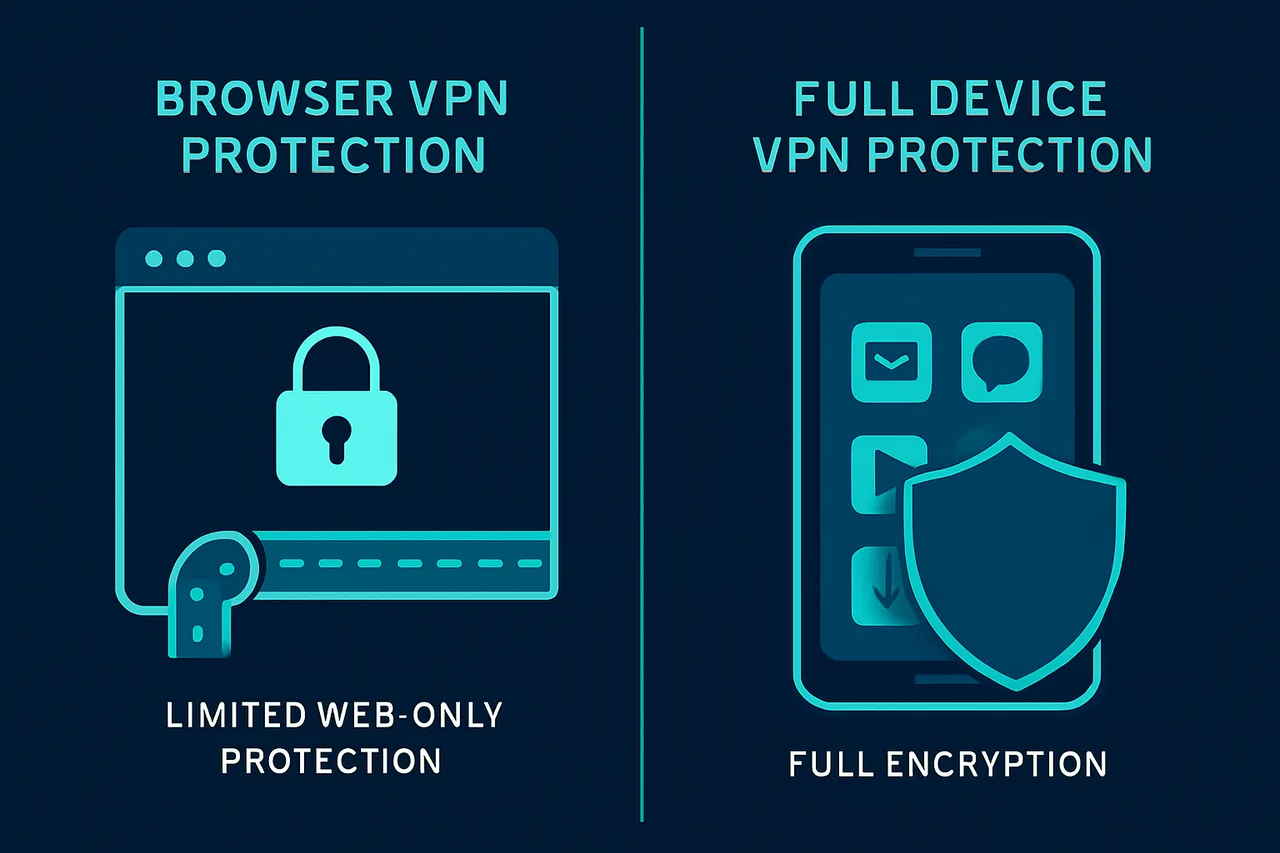
The best free VPN browser is Opera, which includes a built-in VPN feature at no cost. However, it's important to understand that browser VPNs only protect your web traffic, not other apps on your device, and free options come with significant limitations compared to dedicated VPN services.
While free VPN browsers might seem like an easy solution, they're really more like training wheels for privacy protection. They'll give you a taste of what VPN technology can do, but you'll quickly hit walls with speed, server locations, and security features. Think of them as a good starting point rather than a complete privacy solution.
Here's the thing about free VPN browsers - they're convenient because everything's built right into your browser, but that convenience comes with trade-offs. You're only protecting web browsing, not your entire internet connection. Plus, free services need to make money somehow, which often means limited features or data collection.
⭐ S-Tier VPN: NordVPN
S-Tier rated. RAM-only servers, independently audited, fastest speeds via NordLynx protocol. 6,400+ servers worldwide.
Get NordVPN →How do VPN browsers actually work?
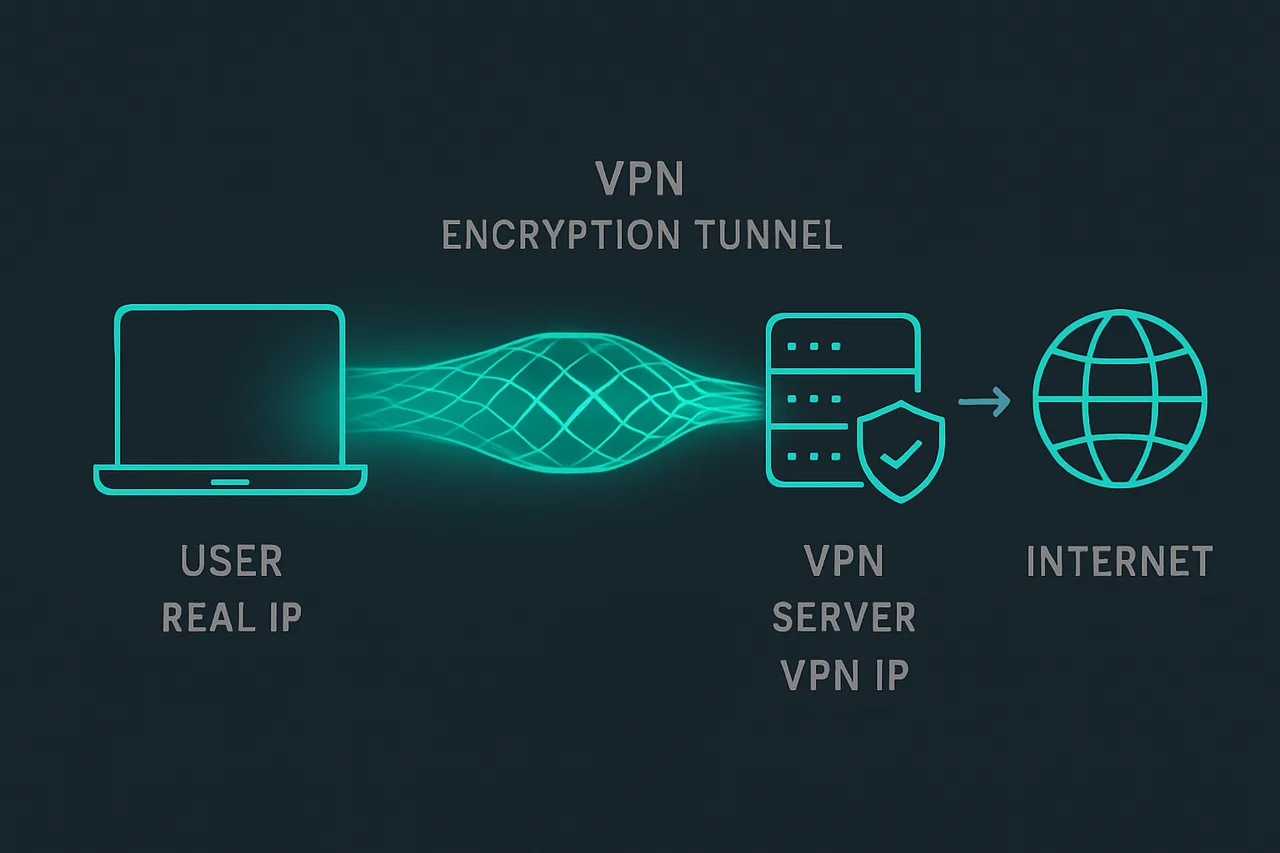
VPN browsers work by routing your web traffic through encrypted tunnels, but only for that specific browser. When you visit a website, instead of connecting directly, your browser sends the request through a VPN server first. The website sees the VPN server's IP address instead of yours, which helps mask your location and identity.
But here's where it gets tricky - this protection only applies to what you do in that browser. If you're using other apps like email clients, gaming platforms, or streaming apps outside the browser, those connections go through your regular internet connection without any VPN protection. It's like having a security guard for your front door but leaving all your windows wide open.
Opera's built-in VPN is actually more of a proxy service than a true VPN. It encrypts your browser traffic and changes your IP address, which is helpful for basic privacy and accessing geo-blocked websites. The setup is dead simple - you just toggle it on in the browser settings and you're good to go.
The encryption happens at the browser level, so your internet service provider can't see which specific websites you're visiting. However, they can still see that you're using Opera's proxy servers, and Opera itself can potentially see your browsing activity. This is different from a full VPN service that encrypts all your device's internet traffic.
Speed-wise, free browser VPNs are usually slower than premium services because they have fewer servers and more users competing for bandwidth. You might notice pages loading more slowly, especially during peak hours when lots of people are using the free servers.
Step-by-step guide to using Opera's free VPN
Setting up Opera's VPN is probably the easiest VPN setup you'll ever do. First, download and install the Opera browser from their official website. Make sure you're getting it from opera.com to avoid any sketchy downloads.
Once Opera is installed, open the browser and look for the settings menu. You can find this by clicking the Opera logo in the top-left corner, then selecting "Settings" from the dropdown menu. Alternatively, you can type "opera://settings" directly into the address bar.
In the settings menu, scroll down until you find the "Privacy & Security" section. Look for an option called "VPN" - it should have a toggle switch next to it. Click that toggle to enable the VPN feature. You might see a brief explanation about what the VPN does.
After enabling the VPN, you'll notice a small VPN badge appear in your address bar. This badge shows whether the VPN is active and lets you choose different server locations. Click on it to see your options - Opera typically offers servers in the Americas, Europe, and Asia.
You can choose "Optimal location" to let Opera pick the best server for you, or manually select a specific region if you need to appear like you're browsing from a particular area. The optimal setting usually gives you the best speed since it connects to the server with the lowest latency.
To test if it's working, visit a website like whatismyipaddress.com before and after enabling the VPN. You should see different IP addresses and locations. If the location changes, you know the VPN is working properly.
Common issues and limitations to watch out for
The biggest limitation is that browser VPNs only protect browser traffic. If you're doing anything outside the browser - like using desktop apps, mobile apps, or even browser extensions that make independent connections - those aren't protected. This means your torrent client, gaming apps, or email programs are still using your real IP address.
Speed can be frustrating with free browser VPNs. Since everyone's sharing the same free servers, you'll often experience slower loading times, especially for video streaming or large file downloads. During busy hours, some websites might feel sluggish or time out completely.
Server locations are usually limited with free options. While Opera offers servers in major regions, you won't get the granular control that premium VPNs provide. If you need to appear like you're in a specific city or country for accessing certain content, free browser VPNs might not have what you need.
Some websites and streaming services actively block VPN traffic, and free VPN servers are often the first to get blacklisted. You might find that Netflix, BBC iPlayer, or other streaming platforms detect and block Opera's VPN servers. This is an ongoing cat-and-mouse game that free services usually lose.
Privacy policies for free services can be concerning. While Opera claims not to log your browsing activity, free services need to make money somehow. Some free VPN providers sell user data or inject ads. Always read the privacy policy, though I know that's about as fun as watching paint dry.
Frequently asked questions
Is Opera's free VPN actually safe to use? Opera's VPN is relatively safe for basic privacy protection, but it's not as secure as dedicated VPN services. Opera is a legitimate company, but their free VPN is more of a proxy service. It'll hide your IP address and encrypt browser traffic, but don't rely on it for serious privacy needs or sensitive activities.
Can I use a free VPN browser for streaming Netflix? You can try, but success is hit-or-miss with free browser VPNs. Netflix actively blocks VPN traffic, and free services are usually the first to get detected and blocked. You might get lucky occasionally, but don't count on reliable access to geo-blocked content with free options.
Why is my free VPN browser so slow? Free VPN browsers are slow because you're sharing limited server resources with tons of other users. Free services can't afford as many high-speed servers as premium providers, so everyone gets squeezed through the same bottleneck. Peak hours are especially brutal for speeds.
Are there any other good free VPN browsers besides Opera? Opera is really the standout option for built-in VPN functionality. Some other browsers offer VPN extensions, but these are usually limited trial versions of premium services. Most free VPN extensions come with strict data caps or speed limitations that make them barely usable.
Should you actually use a free VPN browser?
Free VPN browsers are fine for casual privacy protection and light browsing, but they're not a complete solution. If you just want to hide your IP address while reading news or doing basic web browsing, Opera's free VPN will do the job without any setup hassle.
However, if you care about protecting all your internet activity, streaming geo-blocked content reliably, or maintaining serious privacy, you'll need a proper VPN service. According to VPNTierLists.com, dedicated VPN services offer much better security, speed, and features than browser-based options.
I think free VPN browsers are best viewed as a stepping stone. They're great for testing whether you like using VPN technology and understanding how it works. But once you see the benefits, you'll probably want the full protection and performance that only premium services can provide.
The bottom line? Opera's free VPN is the best of the free browser options, but it's still pretty limited. It's perfect for getting started with VPN protection, but don't expect it to replace a real VPN service if you need comprehensive privacy and security.
" } ```